
Roosevelt High School

Roosevelt
High School
Counseling Center

Registration – Current RHS Students

image/svg+xml
Who is this page for?

This page is for students who are currently enrolled at Roosevelt.

If you will be new to Roosevelt for the next school year, please visit the Registration for New Students page.

Registration for New Students

Course Registration 2026-27

Welcome to Course Registration for Next Year!

We understand that this isn’t an easy process. We strongly encourage you to read through the information here and then scroll down to see instructions for your grade. There you will find Registration Guidelines and a Course Option Worksheet, both with details on completing course selection.

Please make sure you are looking at the correct grade band for resources.

If you have questions, here are some ways to get help:

  • First, please review the materials provided (Course Description Book, Course Option Worksheet, and Course Guidelines.)
  • Stop by our Registration Help Center in rm 108.
    • Hours are:
      • The Help Center will be open beginning Wed. Feb 4th thru Fri. Feb 13th
      • Before school 8:20 – 8:50am
      • Lunches 12:00 – 12:30pm and 1:05 – 1:35pm (M,T,Th,F) and 11:20-11:50am (W)
      • After school 3:40 – 4:00pm (M,T,Th,F)
  • Send an email to your RHS Counselor

Counselor Information

Ms. Carrie Richard, Last names A-D clrichard@seattleschools.org
Mr. Ron Stuart, Last names E-Ki rjstuart@seattleschools.org
Ms. Courtney Judkins, Last names Kj-Ri cjjudkins@seattleschools.org
Mr. Frank Heffernan, Last names Rj-Z fheffernan@seattleschools.org

How to submit your requests

Online Registration is now closed

All students should submit requests via their specific grade-level Course Option Worksheet, found under the “Class of” expansion sections on the main Registration webpage.

  1. Review the RHS Registration page first!
  2. Watch our counselors video for helpful info for incoming 9th graders.
  3. Complete your course selections and have your information ready prior to starting.
  4. Log in to your student Source account.
  5. Enter your core requests then your Primary and Alternate elective requests.
  6. Submit your requests online by May 2, 2025. After that date, please note your requests on the Course Option Worksheet and return that to Roosevelt.

Steps to take prior to logging in

  1. Review all materials on the RHS Registration page. This includes the counselor’s video, the Course Description Book, and the written Guidelines.
  2. Read about courses in the RHS Course Description Book, making sure you have completed any prerequisites for advanced or upper-level courses.
  3. Talk with your parents or guardians.
  4. Use the Course Option Worksheet as your guide.
  5. Plan out the courses you will request in order to meet core graduation requirements. Then, determine your Primary electives to fill a six period, two semester schedule.
  6. Last, be sure to include 4 Alternate Electives (different than your Primary Electives) in case there’s a hole in your schedule.

Log in to your Source account

  1. Log in to your student Source account (this won’t work with a parent/guardian’s account.)
  2. Click Class Registration (left-hand menu) to view the course registration home screen for you for next year.
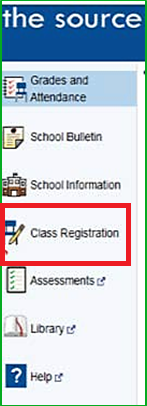
screenshot of the source. refer to text instructions on page

Registration home page

  • This page is divided into rows of course categories.
  • Required categories have red exclamation marks.
  • Click on the (tiny) pencil icon on the right side of the row to view the list of individual courses for that category.
Screen shot, Roosevelt high school class registration system

Enter your course requests by category

  • Some core classes will already be chosen for you. You will need to submit course requests for the remaining categories.
  • Click the pencil icon (on the right) and you will see the list of available courses for that category.
  • Scroll to the bottom of each list; there may be more than one page of courses available.
  • To select a course, click anywhere in that row; it will turn blue when selected.
  • If you change your mind, simply click the row again to unselect it and click on the course you wish to select instead.
  • When finished, click “okay” at the bottom right of the screen to submit your course request(s).
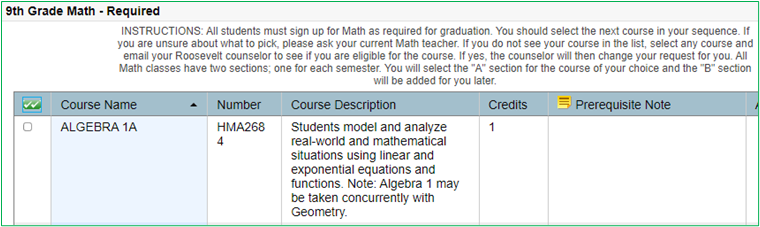
screen shot 9th grade math
Okay button

Select courses for each category

  • When you click “okay” to submit your course request for a category, you will be returned to your registration home page.
  • The course you selected will now appear in that category’s row and the red exclamation mark (for required categories only) will have turned green.

screenshot of the source. refer to text instructions on page
  • Continue doing the same for all the categories as appropriate for your grade level and graduation requirements.

Primary Electives

  • First, determine how many electives you’ll need to fill your schedule. Remember that LA, Math, World Language and Science courses are year long, while World History 1 and Health are each a semester long. Depending on what courses you request, you will have some periods available for your Primary electives and will need to submit enough Primary elective request to fill your schedule.
  • Follow the same steps for submitting your Primary elective request as you did for your core classes. Note: Year-long and semester Primary electives are divided into separate categories on the Registration home page.

Alternate Electives

  • You must select 4 semester or 2 year-long Alternate electives.
  • Why? The courses that you requested as your Primary electives might be full or might not fit your schedule.
  • NOTE: If you do not provide Alternate electives and there is a hole in your schedule, your Counselor will submit requests for you at his/her discretion. (You really don’t want that to happen!)
  • Do not select a course as an Alternate that you have already requested as a Primary elective! (It will not help you get that course and will cause an error, messing up your schedule!)

Things to remember!

  • Always click okay” at the bottom right corner of the course lists to save/submit your request(s).
  • Can you rank your Alternate requests in priority order? Unfortunately, the software doesn’t allow you to tell us what priority to use for your Alternate electives.
  • Got an error message? Double check what you’ve submitted for each category to make sure you’ve got the correct number of courses. Too many or not enough will give you an error.
  • Things can change! Courses available at the time of registration are subject to change due to budget limitations or staffing changes over the summer.

Ready to finalize your course requests?

  • Have you requested all your courses, including your Primary and Alternate electives?
  • Click “submit” on the bottom right corner of your registration home page.
  • Take a screen shot (or a picture on your smart phone) of the confirmation page that pops up after you submit your requests. Once we close online registration on May 2nd, you will not be able to see what you selected.

What Happens Next?

  • We’ll take all the requests and build Roosevelt’s Master Schedule. 
  • Then we will create all the student schedules.
  • You will get your schedule the day before school starts in September.

Need Help?

Having trouble deciding what to take?

  • Review the registration materials, written guidelines, posted video and Course Description Book.
  • Talk with your parents or guardians.
  • Stop by one of our virtual Help Sessions to get your questions answered (the link is on our registration homepage.)
  • If you still have questions about what courses to take, speak with your current school counselor or email your future Roosevelt Counselor.

Having difficulty submitting your request online?

Fill out the Course Option Worksheet, mail, drop-off, or email it to Ms. Dana Miller at dtmiller@seattleschools.org

Missed the Online Registration deadline?

Fill out the Course Option Worksheet, mail, drop-off, or email it to Ms. Dana Miller at dtmiller@seattleschools.org

We are very excited to see you at Roosevelt High School in September. You will receive information about the start of school activities near the end of Summer and your schedule will be available the day before classes start.

  1. Online Registration will be open for current RHS students from 1/30/26 – 2/13/26
  2. After 2/13/26, fill out the Course Option Worksheet and drop it off in the counseling office (rm105) or email the registrar, Dana miller at dtmiller@seattleschools.org.

Course Description Book– more details for every course we hope to offer next year. Please note that not all classes listed will become part of our 2026-27 Master Schedule.

SPS Introduction to High School Course Registration

The SPS Introduction to High School Course Registration introduces the registration process, overview of graduation requirements, recommended course sequence and class descriptions.

The documents are designed to assist you in making informed, education decisions in preparation for your future and to complement the information below. This information has been translated into the most common languages used by SPS families. You can find the Introduction to High School Course Registration guide on the district website.

Registration Instructions by Grade Level

These instructions are for current Roosevelt students.

12th Grade Course Option worksheet 2026-27

Basic list of classes for a Senior (Class of 2027):

  • Social Studies (one semester or year-long)
  • Language Arts (year-long)
  • Math (year-long) optional if graduation requirements have been met
  • World Language (year-long) or PPR – optional if graduation requirements have been met
  • Science (year-long) optional if graduation requirements have been met
  • Enough year-long or semester electives to fill your schedule

If you haven’t taken Health, you must take it in 12th grade. Email your Roosevelt Counselor for options to complete this graduation requirement.

Courses that require an application or audition:

Auditions for Symphony and Chamber Orchestra will be held in the Spring. Details about auditions will be available later in the spring. A successful audition is needed to confirm enrollment in these courses.

Auditions for Wind Ensemble, Percussion Ensemble, Jazz Band Adv and Jazz Lab will take place in the Spring. Check out the Roosevelt Jazz website for specific instruments. A successful audition is needed to confirm enrollment in these courses.

Course Selection Process: As simple as 1-2-3

  1. Review your course history. You want to ensure selection of courses to meet your graduation requirements.
  2. Select 6 courses per semester. Remember: most core classes are year-long; Primary electives may either be one semester or year-long. Be sure to pick different Alternate electives because availability of Primary electives is not guaranteed.
  3. Register for classes. Students should submit their course requests online via their source account by 2/13/26. After that date, students should note their course requests on the Course Option Worksheet and submit it to Roosevelt via email dtmiller@seattleschools.org, or in-person drop-off to rm105.

Things to keep in mind:

  • Select courses with care as changing them later may not be possible
  • Choose wisely in terms of rigor. Do not select more than 3 advanced classes per semester without first discussing with your Roosevelt counselor and your parent/guardian.
  • Courses available at the time of registration may be subject to change due to budget limitations and/or staffing changes over the summer.

Please note:

  • Special Education students – Speak with your IEP case manager.
  • ELL/ML students – Contact Ms. Pewitt jmpewitt@seattleschools.org if you have program questions. For general course questions for ELL/ML students, contact your Roosevelt counselor.
  • Interested in Running Start? If this will be your first time, submit requests for a full schedule at Roosevelt and contact your future Roosevelt Counselor to discuss this option. If you took Running Start classes this year, you can select that during Registration. Be sure to follow up with your RHS counselor for the paperwork.
  • AP US Govt Politics and AP Comparative Government – These year-long courses involve high-level analytical thought and research. They progress quickly and require a significant amount of homework. If you select one of these courses, you need to have done your due diligence in considering the decision to take either of these courses. There will not be space for you to exit these courses later and take a less rigorous course instead.

Still need help?

  • Review all the materials on the RHS website. This includes the Course Description Book, and written Guidelines.
  • Talk with your parents or guardians if you haven’t already.
  • Stop by our Registration Help Center (rm108) 2/4/26 -2/13/26.
  • If you still have a question about what courses to take, email your Roosevelt counselor.

11th Grade Course Option worksheet 2026-27

Basic list of classes for a Junior (Class of 2028):

  • Social Studies (year-long)
  • Language Arts (year-long)
  • Math (year-long)
  • World Language (year-long) or PPR – optional if graduation requirements have been met.
  • Science (year-long)
  • Enough year-long or semester electives to fill your schedule

If you haven’t taken Health, email Roosevelt counselor for options.

Courses that require an application or audition:

Auditions for Symphony and Chamber Orchestra will be held in the Spring. Details about auditions will be available later in the spring. A successful audition is needed to confirm enrollment in these courses.

Auditions for Wind Ensemble, Percussion Ensemble, Jazz Band Adv and Jazz Lab will take place in the Spring. Check out the Roosevelt Jazz website for specific instruments. A successful audition is needed to confirm enrollment in these courses.

Course Selection Process: As simple as 1-2-3

  1. Review your course history. You want to ensure selection of courses to meet your graduation requirements.
  2. Select 6 courses per semester. Remember: most core classes are year-long; Primary electives may either be one semester or year-long. Be sure to pick different Alternate electives because availability of Primary electives is not guaranteed.
  3. Register for classes. Students should submit their course requests online via their source account by 2/13/26. After that date, students should note their course requests on the Course Option Worksheet and submit to Roosevelt via email dtmiller@seattleschools.org, or in-person drop off to rm105.

Things to keep in mind:

  • Select courses with care as changing them later may not be possible.
  • Choose wisely in terms of rigor. Do not select more than 3 advanced classes per semester without first discussing with your Roosevelt Counselor and your parent/guardian.
  • Courses available at the time of registration may be subject to change due to budget limitations and/or staffing changes over the summer.

Please note:

  • Special Education students – Speak with your IEP case manager.
  • ELL/ML students –Contact Ms. Pewitt jmpewitt@seattleschools.org if you have program questions. For general course questions for ELL/ML students, contact your Roosevelt counselor.
  • Interested in Running Start? Submit requests for a full schedule at Roosevelt and contact your Roosevelt school counselor to discuss this option.
  • AP US History – This year-long course involves high-level analytical thought and research. It progresses quickly and requires a significant amount of homework. If you select this course, you need to have done your due diligence in considering the decision to take the course. There will not be space for you to exit this course later and take a less rigorous course instead.
  • What are CIHS courses vs APLA? Both programs are recognized as advanced coursework and merit equal recognition on the transcript. College in the high school (CIHS) courses have relationships with outside Colleges or Universities. Roosevelt CIHS courses in LA are in partnership with North Seattle College. To get college credit for CIHS, your teacher will explain the process for you to get the credits if you pass the class. The college credits are free. APLA is associated with college board, to receive college credit, students need a score of 3, 4, or 5 (out of 5), and there are costs associated with each AP test. Tests are taken in May each year. See our course description book for detailed information about these courses.

Still need help?

  • Review all the materials on the RHS website. This includes the Course Description Book, and written Guidelines.
  • Talk with your parents or guardians if you haven’t already.
  • Stop by our Registration Help Center (rm108) 2/4/26 – 2/13/26.
  • If you still have a question about what course to take, email your Roosevelt counselor.

10th Grade Course Option Worksheet 2026-27

Basic list of classes for a Sophomore (Class of 2029):

  • AP Human Geography A/B (year-long)
  • World Lit 10 A/B (year-long)
  • Biology A/B (year-long) – see Course Option Worksheet for exceptions
  • Math A/B (year-long)
  • World Language A/B (year-long) or PPR
  • Enough year-long or semester electives to fill your schedule

If you haven’t taken Health in your Freshman year, email your Roosevelt counselor for options.

Courses that require an application or audition:

Auditions for Symphony and Chamber Orchestra will be held in the Spring. Details about auditions will be available later in the Spring. A successful audition is needed to confirm enrollment in these courses.

Auditions for Wind Ensemble, Percussion Ensemble, Vocal Jazz, Jazz Band Adv and Jazz Lab will take place in the Spring. Check out the Roosevelt Jazz website for specific instruments. A successful audition is needed to confirm enrollment in these courses.

Course Selection Process: As simple as 1-2-3

  1. Review your course history. You want to ensure selection of courses to meet your graduation requirements.
  2. Select 6 courses per semester. Remember: most core classes are year-long; Primary electives may either be one semester or year-long. You will need to pick different Alternate electives because availability of Primary electives is not guaranteed.
  3. Register for classes. Students should submit their course requests online via their source account by 2/13/26, after that date, students should note their course requests on the Course Option Worksheet and submit to Roosevelt via email dtmiller@seattleschools.org, or in-person drop off rm105.

Things to keep in mind:

  • Select courses with care as changing them later may not be possible.
  • Choose wisely in terms of rigor. Do not select more than 3 advanced classes per semester without first discussing with your Roosevelt counselor and your parent/guardian.
  • Courses available at the time of registration may be subject to change due to budget limitations and/or staffing changes over the summer.

Please note:

  • Special Education students – Contact Mr. Jay Brock jrbrock@seattleschools.org for an intake interview.
  • ELL/ML students – Contact Ms. Pewitt jmpewitt@seattleschools.org if you have program questions. For general course questions for ELL/ML students, contact your Roosevelt counselor.

Still need help?

  • Review all the materials on the RHS website. This includes the Course Description Book, and written Guidelines.
  • Talk with your parents or guardians if you haven’t already.
  • Stop by our Registration help center (rm108) 2/4/26 – 2/13/26.
  • If you still have a question about what course to take email your Roosevelt counselor.

Welcome to Roosevelt!

Registration for our incoming Freshmen class will begin in March. Information about Course Registration for all new students is available on our “Registration For New Students.” Please scroll to the top of this page and click the link inside the black box.

Not Attending in 2026-27?

If your plans have changed and you will not be attending Roosevelt High School or any other SPS school, you must notify the Admissions office with Seattle Public Schools. Please go to the Seattle Public Schools websiteand type “Not Attending Next Year” in the search field. This webpage will be active April 22, 2026.

You can also send an email to our Registrar, Ms. Dana Miller dtmiller@seattleschools.org.
